Purpose: Pausing an Agentic Workflow allows you to halt the process while keeping it active, enabling you to resume it later from the same step without losing progress
When you pause an Agentic Workflow for a contact, it can be resumed later from the same step. This allows for flexibility, as the Agentic Workflow will remain active and in progress until you decide to resume it.
Here are the simple steps to pause an Agentic Workflow:
1. Navigate to Data tab from the top menu
2. Select Contacts
3. Search for the contact you would like to pause the Agentic Workflow for
4. Click on the contact's name

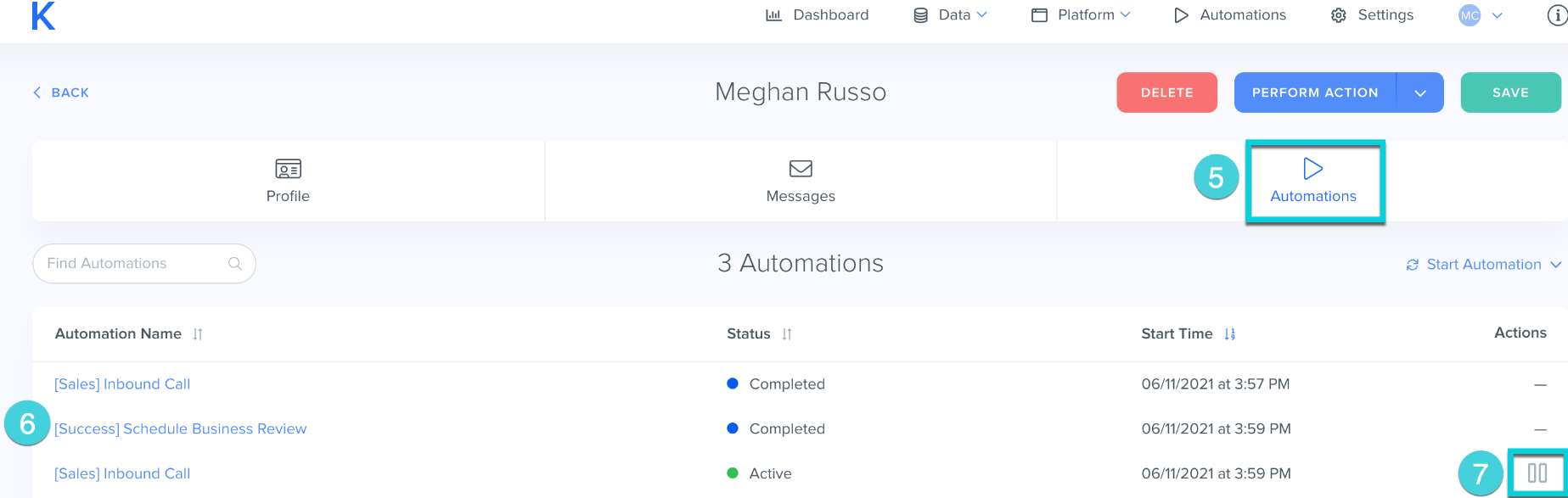
5. Locate the Agentic Workflow tab and select it
6. Find the Agentic Workflow you would like to pause
7. Click Pause in the action column
Hint: If you would like to cancel the Agentic Workflow, the contact will restart the Agentic Workflow from the beginning
Related Articles:
Was this article helpful?
That’s Great!
Thank you for your feedback
Sorry! We couldn't be helpful
Thank you for your feedback
Feedback sent
We appreciate your effort and will try to fix the article