This guide will walk you through how to create new agent accounts.
If you're looking to provision an agent to an Agent CRM, click here.
1. Navigate to the Agents & Agencies object.
Note: If your toolbar isn't configured with an Agent menu, you can find Agents & Agencies under either Data > Custom Objects or Platform > Custom Objects
2. Click on the New Agent/Agency button.

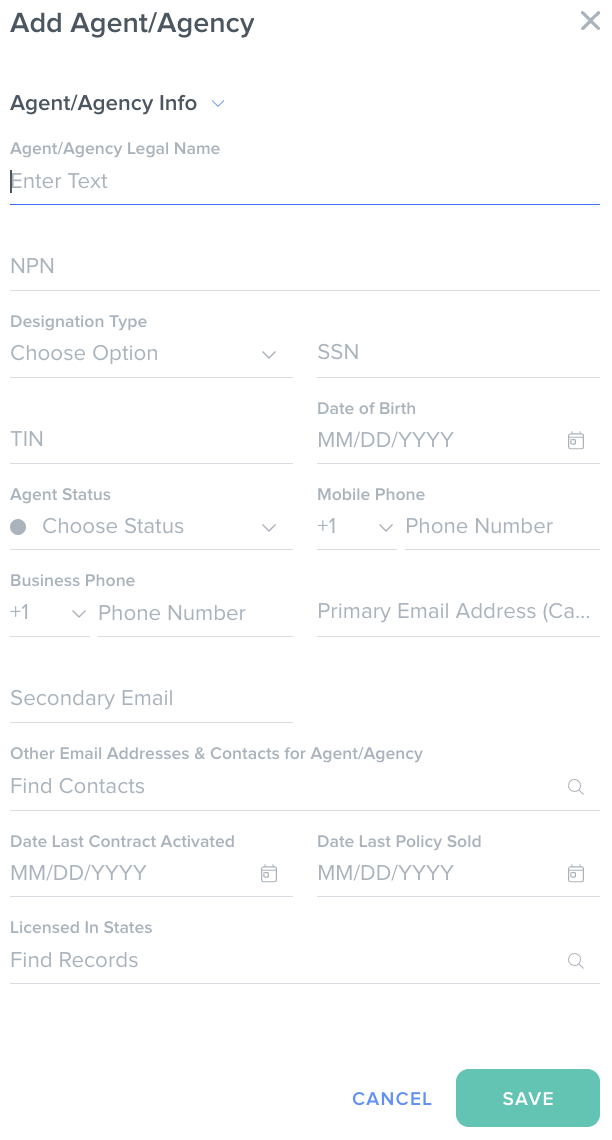
3. Fill out the Add Agent/Agency form; click Save.
At minimum, be sure to add the name, NPN, SSN, primary email address, and mobile phone.
Was this article helpful?
That’s Great!
Thank you for your feedback
Sorry! We couldn't be helpful
Thank you for your feedback
Feedback sent
We appreciate your effort and will try to fix the article