Difficulty: Beginner

Purpose: Learn about the Agent CRM Enrollments object and the most critical fields for tracking your clients' insurance application process.
TABLE OF CONTENTS
What is the "Enrollments" Object?
We know how crucial it is to track your clients' enrollments throughout the insurance application process — Kizen's Enrollments object syncs this pipeline seamlessly from SunFire or Connecture to your Agent CRM. The Enrollments object is customized to capture the most critical data, including the specific insurance carrier, product type, premium amount, and each stage of the enrollment process. Most importantly, when you complete these enrollments, they will automatically display on the related Contact records so that you can easily access this information anytime!
To find these fields:
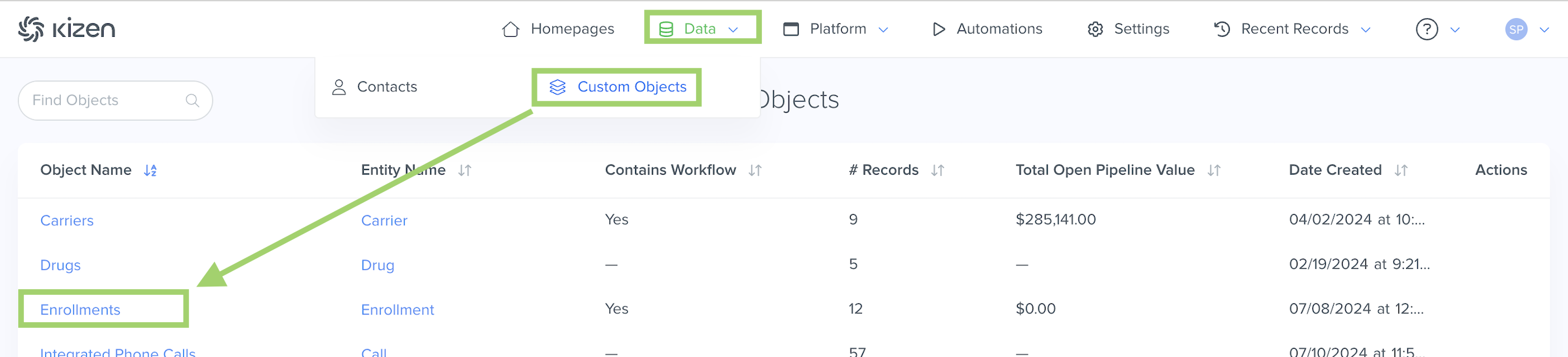
- Click on "Data" in the top menu bar > "Custom Objects" > "Enrollments" OR "Platform" > "Custom Objects" > "Enrollments" (depending on your toolbar template).
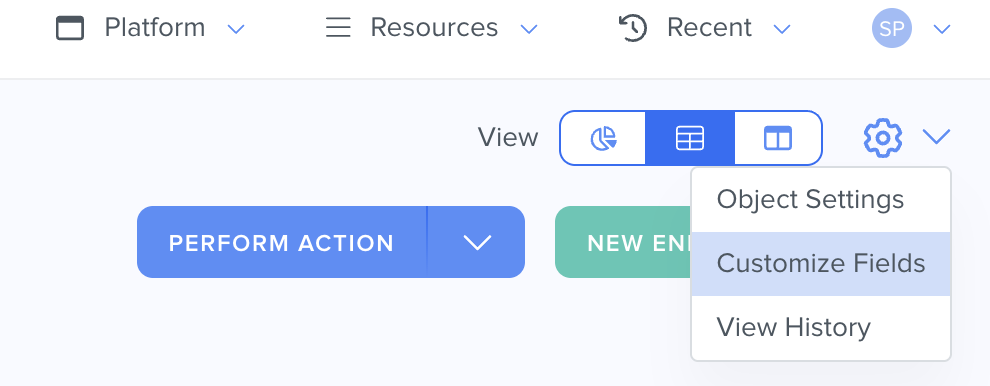
- Click on the gear icon in the top right > Customize Fields.
⚠️ Warning: It's crucial that you do not change the field API name for any of the Agent CRM default fields, as this can potentially break integration configurations.What Are the "Enrollments" Fields?
See below for a list of all of the fields that come in the pre-built Enrollments object and some important things to consider for your Agent CRM workflow.
| Field Name | Field API Name | Field Type | Field Options | Notes |
| Enrollment Name | name | text | The Enrollment Name field is the unique identifier for the Enrollment object. No two Enrollments can have the same name. | |
| Primary Applicant | primary_applicant | relationship | The Primary Applicant field is a Relationship field to display the Contact applying for the enrollment. For the integration to sync the correct Contact record, you must launch SunFire or Connecture from the Contact record in the Agent CRM first. | |
| Carrier | carrier | relationship | The Carrier field is the health insurance company for the enrollment's specific insurance product. | |
| Plan Year | plan_year | text | The Plan Year is the fixed 12-month period for the insurance plan. | |
| Product | product | dropdown | MA MAPD MSUP PD PDP IN Cancer Life Short Term LTC Dental Term Life Final Expense Hospital Indemnity Short Term Home Care MYGA-Annuity Universal Life Whole Life FIA Annuity SPIA Annuity DSNP CSNP SNP Annuity Disability Income Long Term Care Fixed Annuity Variable Annuity Immediate Annuity Equity Indexed Annuity Variable Universal Life Fixed Indexed Annuity Deferred Income Annuity Medicare Supplement Multi-Year Guaranteed Annuity Single Premium Immediate Annuity Group Annuity Non-Insurance Product Indexed Variable Annuity Disability Buy-out Permanent Life Insurance Accident And Health Single Premium Deferred Annuity Indexed Universal Life Contingent Deferred Annuity Property Third Party Advisory Programs Mutual Fund Direct 529 Plans 1031 Exchanges Multi-Fund Commission-Based Retirement Plans Fee-Based Retirement Plans Home Office Registered Indexed Annuity Training Combo Mutual Fund Custodial Account Traditional Fixed Annuity Registered Retirement Income Fund | The Product is the specific type of insurance, annuity, or financial product associated with the enrollment. |
| Product Detail | product_detail | dropdown | C-SNP D-SNP I-SNP PDP PPO HMO | The Product Detail field displays the exact insurance plan subtype or model. |
| Enrollment Code | enrollment_code | text | The Enrollment Code field displays the unique code generated by the enrollment platform. | |
| Effective Date | effective_date | date | The Effective Date field displays the date when the insurance coverage begins. | |
| Premium | premium | money | The Premium field displays the amount the client will pay for the insurance policy. | |
| Reasons Lost | reasons_lost | dynamictags | The Reasons Lost field displays why the enrollment was not completed. | |
| Reasons Disqualified | reasons _disqualified | dynamictags | The Reasons Disqualified field displays why a lead, prospect, or applicant was disqualified from moving forward in the enrollment. | |
| Stage | stage | dropdown | Started Submitted Approved by Carrier | The Stage field displays the current status of the enrollment. |
| Description | description | longtext | ||
| Files | files_1 | files | ||
| Date Created | created | datetime | The Date Created field is the date and time the record was added to the object. | |
| Last Modified | updated | datetime | The Last Modified field displays the most recent date and time that the record was updated. | |
| Enrollment Value | entity_value | money | The Enrollment Value displays the monetary value associated with a specific enrollment, such as the expected revenue, commissionable premium, or contract value generated from the enrollment. | |
| Estimated Close Date | estimated_close _date | date | The Estimated Close Date displays when the enrollment is expected to be completed. | |
| Actual Close Date | actual_close_date | datetime | The Actual Close Date displays when the enrollment is actually completed. | |
| Agent NPN | agent_npn | text | The Agent NPN displays the Agent National Producer Number (a unique identification number assigned to licensed insurance agents) of the agent who completed the enrollment. | |
| % Chance to Close | percentage_chance _to_close | integer | The % Chance to Close field displays the estimated likelihood (by percentage) that an enrollment will successfully close. | |
| Owner | owner | team_selector | ||
| Display Name | display_name | text | The Display Name field is a read-only field that displays the name of the record. | |
| File | file | files | ||
| Sunfire Prospect ID | sunfire_prospect _id | text | ||
| Sunfire Session | sunfire_session | relationship | The Sunfire Session field is a Relationship field to display the related Sunfire Saved Session object record. | |
| Sunfire Form Type | sunfire_form_type | text | ||
| Webhook Payload | webhook_payload | longtext | The Webhook Payload field displays the data package or message sent automatically by one system to another via webhook. |
Related
- Upload Your Contacts Into Agent CRM
- Add a New Custom Field
- Agent CRM: "Contacts" Object Overview
- Agent CRM: "Carriers" Object Overview
- Agent CRM: "Drugs," "Pharmacies," & "Providers" Objects Overview
Need Help?
If you encounter any issues or have additional questions, reach out to support@kizen.com.
Was this article helpful?
That’s Great!
Thank you for your feedback
Sorry! We couldn't be helpful
Thank you for your feedback
Feedback sent
We appreciate your effort and will try to fix the article